ASP.NET 程序设计 登入查询页面详解
目录
本文涉及刘老师清华大学出版社教材
167-183页内容前置准备
需要完成以下前置准备工作,方可进行下一节代码调试
数据库设计
如想要实现数据库连接,需要先使用 SSMS(SQL Server Management Studio)创建数据库和数据表并手动修改添加数据。 以下为 SQLServer 数据库的创建教程和数据表的创建教程,请根据实际情况进行操作 0。
- SSMS 连接
服务器类型:
数据库引擎服务器名称:(local)身份验证:Windows身份验证 - 创建数据库
数据库名称为
Studentdata,以下“database=该数据库名称” - 创建数据表tbl_Userinfo (登入信息表)
| 字段 | 用途 | 字段类型 |
|---|---|---|
user_name | 用户名 | nchar(10) |
pwd | 密码 | nchar(10) |
tbl_Studentinfo (学生信息表)
| 字段 | 用途 | 字段类型 |
|---|---|---|
userid | 学号 | nchar(10) |
name | 姓名 | nchar(10) |
gender | 性别 | nchar(10) |
birthday | 出生日期 | datetime |
telephone | 电话 | nchar(11) |
页面设计
- Login.aspx.cs 登入页面
| 名称 | 用途 | 组件类型及 ID |
|---|---|---|
登入📨 | 验证跳转 | Button1_Click |
重置💿 | 清空文本框 | Button2_Click |
账号📝 | 录入账号 | TextBox1 |
密码📝 | 录入密码 | TextBox2 |
- Search.aspx.cs 查询页面
| 名称 | 用途 | 组件类型及 ID |
|---|---|---|
学号🔍 | 查询依据 | TextBox0 |
提交📨 | 查询数据库 | Button1_Click |
学号📃 | 结果显示 | TextBox1 |
姓名📃 | 结果显示 | TextBox2 |
性别📃 | 结果显示 | TextBox3 |
出生📃 | 结果显示 | TextBox4 |
电话📃 | 结果显示 | TextBox5 |
页面布局
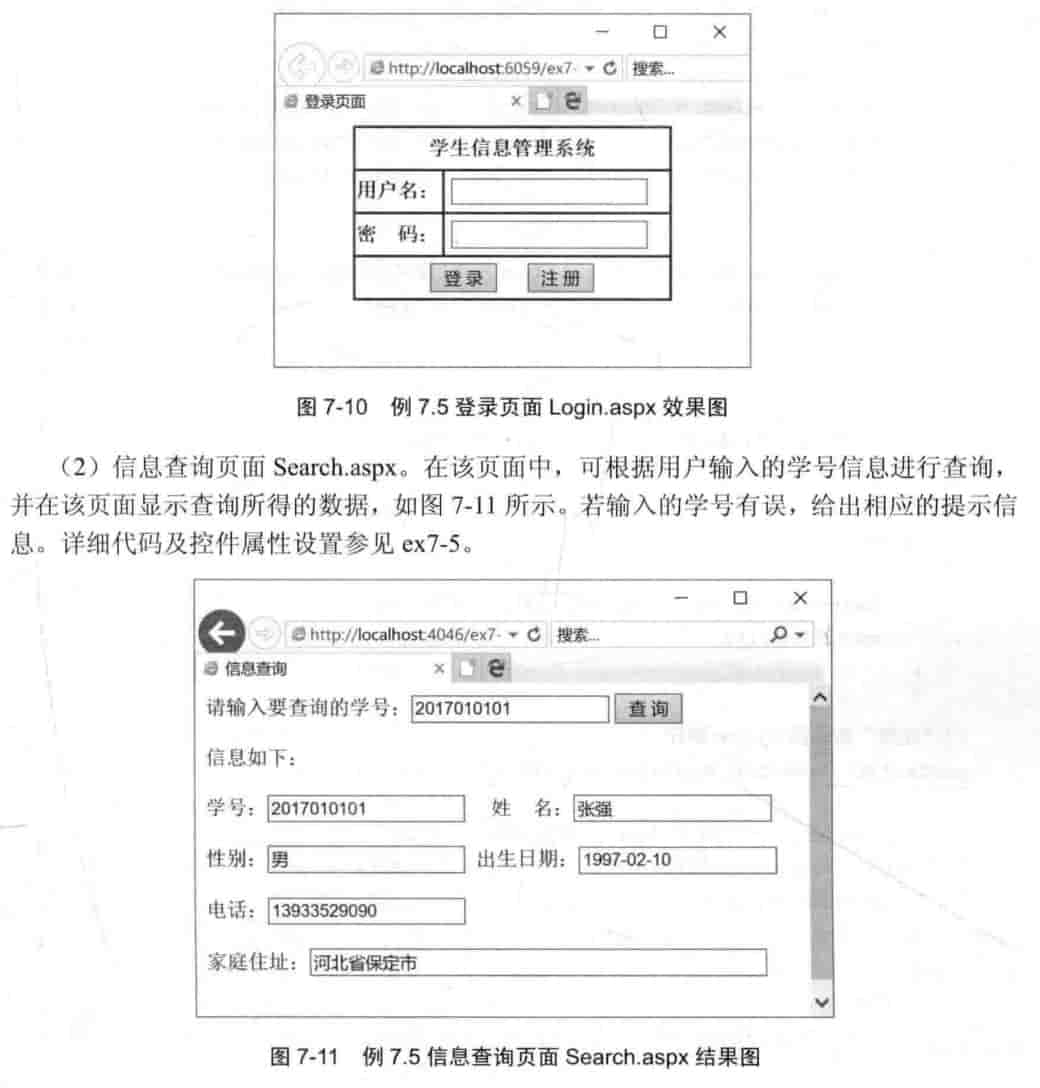
受有限带宽影响图片加载较慢请耐心等待
ASP.NET Web 登录与查询功能代码
以下为基于 C#的 ASP.NET Web 登录功能代码实现,完成以上准备工作后,请将代码复制到对应的文件中,并确保代码中的数据库连接字符串正确。
参考代码前后请双击按钮组件以确保被正确定位到 C#代码
Login.aspx.cs 登入页面
using System;
using System.Data.SqlClient;
using System.Data;

public partial class Login : System.Web.UI.Page
{
    protected void Page_Load(object sender, EventArgs e){}//页面加载时执行
    protected void Button2_Click(object sender, EventArgs e)
    {
        TextBox1.Text = "";
        TextBox2.Text = "";
        TextBox1.Focus(); //焦点设置
    }
    protected void Button1_Click(object sender, EventArgs e)
    {
        SqlConnection con = new SqlConnection();
        con.ConnectionString = "server=(local);database=Studentdata;trusted_connection=true";
        try
        {
            con.Open();
            SqlCommand cmd = new SqlCommand();
            cmd.Connection = con;
            cmd.CommandType = CommandType.Text;
            cmd.CommandText = "select count(*) from tbl_Userinfo where user_name='" + TextBox1.Text + "' and pwd='" + TextBox2.Text + "'";
            int i = Convert.ToInt16(cmd.ExecuteScalar());
            if (i == 1)
            {
                Response.Redirect("Search.aspx");
            }
            else
            {
                Response.Write("用户名密码错误,请重新输入!");
                TextBox1.Text = "";
                TextBox2.Text = "";
                TextBox1.Focus(); //焦点设置
            }
        }
      catch
        {
            Response.Write("数据库连接失败!");
        }
    }
}
Search.aspx.cs 查询页面
using System;
using System.Data.SqlClient;
using System.Data;

public partial class Search : System.Web.UI.Page
{
    protected void Page_Load(object sender, EventArgs e){}
    protected void Button1_Click(object sender, EventArgs e)
    {
        SqlConnection con = new SqlConnection();
        con.ConnectionString = "server=(local);database=Studentdata;trusted_connection=true" ;
        try
        {
            con.Open();
            SqlCommand cmd = new SqlCommand();
            cmd.Connection = con;
            cmd.CommandType = CommandType.Text;
            cmd.CommandText = "select count(*) from tbl_Studentinfo where userid='" + TextBox0.Text + "'";
            int i = Convert.ToInt16(cmd.ExecuteScalar());
            if (i == 1) //判断学号是否存在
            {

                SqlCommand cmd2 = new SqlCommand();
                cmd2.Connection = con;
                cmd2.CommandType = CommandType.Text;
                cmd2.CommandText = "select * from tbl_Studentinfo where userid='" + TextBox0.Text + "'";
                SqlDataReader dr = cmd2.ExecuteReader();
                while (dr.Read())
                    {
                    TextBox1.Text = dr.GetString(0);//学号
                    TextBox2.Text = dr.GetString(1);//姓名
                    TextBox3.Text = dr.GetString(2);//性别
                    TextBox4.Text = Convert.ToString(dr.GetValue(3));//出生//若为nchar类型,则使用GetString方法
                    TextBox5.Text = dr.GetString(4);//电话
                }
                dr.Close(); //关闭数据读取器
                con.Close(); //关闭数据库连接
            }
            else {
                Response.Write("记录不存在");
            }
        }
        catch {
            Response.Write("数据库连接失败!");
        }
    }
}